
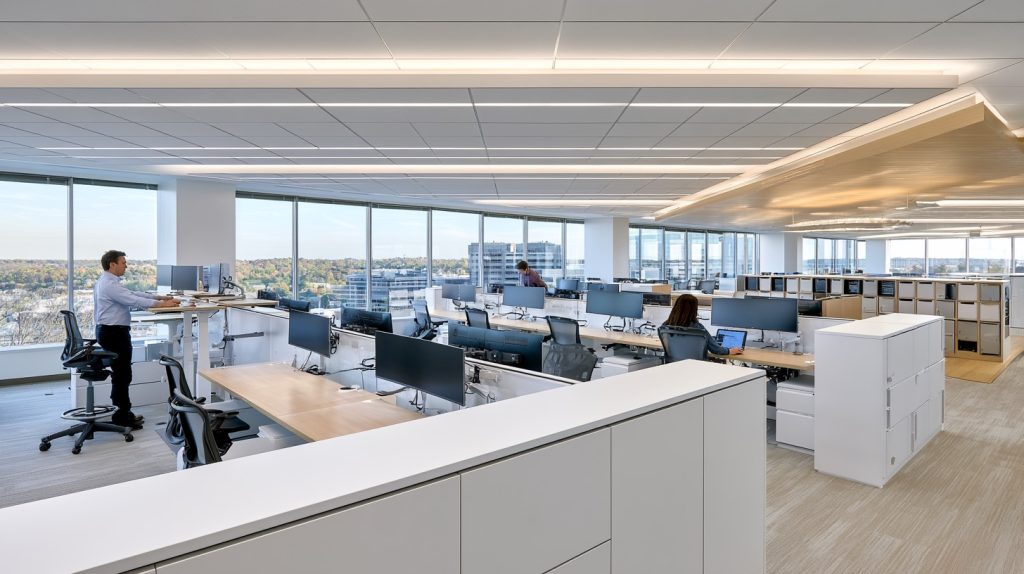
Hoteling and Hot-Desking Done Right: Furniture Systems for Hybrid Teams That Share Space
The Hybrid Office Has a Furniture Problem
Across Northern Virginia and the Washington DC metro area, hybrid work is no longer an experiment — it’s the standard operating model. But many offices that made the shift are still running on furniture designed for a different era: assigned desks, fixed workstations, and layouts that assume the same person sits in the same chair every single day.
The result? Half the office sits empty on Mondays and Fridays while Tuesdays feel like everyone showed up at once. If that sounds familiar, it’s time to align your furniture strategy with the way your team actually works.
Hoteling and hot-desking are two proven models for flex offices — and when they’re backed by the right furniture systems, they can transform a dated workspace into something genuinely efficient and professional.
Hoteling vs. Hot-Desking: Know the Difference
The terms get used interchangeably, but they describe two distinct approaches:
Hot-desking means employees arrive and claim any available workstation on a first-come, first-served basis. No reservations, no assigned spots. It works well for smaller teams with predictable flow and a culture that doesn’t depend heavily on personalization.
Hoteling takes a more structured approach. Employees reserve a workspace in advance — often through a scheduling app or office management system. It suits larger hybrid teams, organizations with compliance considerations, or offices where different roles need different setups (collaborative areas, quiet zones, phone booths).
Both models succeed or fail based almost entirely on the furniture and configuration behind them.
Furniture Systems That Work for Shared Spaces
Not all desks and chairs are built for high-turnover, multi-user environments. Here’s what actually works:
Benching Systems
Long, clean benching runs give you maximum seat density with minimal footprint. They’re easy to keep organized, simple to clean between users, and visually open — a big plus in modern office design. Look for systems with integrated cable management to keep shared surfaces tidy.
Height-Adjustable Desks
In a hot-desk or hoteling setup, one of the biggest friction points is ergonomics. A 5’4″ marketing coordinator and a 6’2″ project manager have very different needs from the same workstation. Height-adjustable desks — including quality sit-to-stand options from All Business Systems — solve this instantly. Users set the height when they arrive and get comfortable immediately. It’s one of the smartest investments a flex office can make.
Modular Panel Systems
Low-panel systems (42″ to 48″ high) create a sense of individual space without closing off the floor. They’re reconfigurable as your team size changes — critical for organizations in growth mode throughout the DC metro corridor.
Lightweight Task Seating
Shared chairs need to be durable, adjustable, and easy to wipe down. Look for task chairs with tool-free seat height, lumbar, and armrest adjustments. Ergonomic mesh backs are popular in hoteling setups because they accommodate varied body types and ventilate well for all-day comfort.
Personal Storage Solutions
If desks aren’t assigned, employees still need somewhere to put their things. Day-use lockers — typically placed near the entry or along a wall — let workers store personal items and retrieve them at any desk. This is a detail that often gets overlooked in hoteling implementations, and it makes a real difference in adoption.
How to Configure a Flex Office That Doesn’t Feel Like a Free-for-All
Furniture selection is only half the equation. Configuration matters just as much. Here are a few principles that work particularly well for Northern Virginia and DC-area offices:
- Zone your floor plan. Separate focused work areas from collaborative hubs. Give phone and video call users a quiet-enough zone that doesn’t disrupt the rest of the floor.
- Create touchdown stations near the entrance. These are short-use desks for employees who only need 30–60 minutes of workspace. They reduce competition for premium seats deeper in the office.
- Keep shared surfaces minimal. The less that lives on a hot desk permanently, the faster turnover works. Built-in cable drops and power access beat tabletop clutter every time.
- Design for visibility. Open layouts with clear sightlines make it easier for employees to spot available seats without awkwardness — and make managers comfortable with the trade-off of unassigned seating.
Common Mistakes Hybrid Offices Make
A few things we see frequently in DC-area offices that undermine an otherwise solid hoteling setup:
- Buying standard fixed-height desks and hoping for the best on ergonomics
- Under-specifying storage, leading to desks cluttered with personal items
- Choosing chairs that are difficult to adjust, discouraging people from personalizing their temporary workstation
- Skipping acoustic treatments — shared spaces without proper sound management become chaotic quickly
All Business Systems Helps Northern Virginia Teams Get This Right
Designing a hoteling or hot-desking environment isn’t just about ordering furniture — it requires thinking through traffic patterns, team workflows, ergonomic range, and long-term flexibility. All Business Systems has been helping Northern Virginia and DC metro organizations navigate exactly these decisions for years.
Whether you’re outfitting a full floor in Tysons, redesigning a suite in Reston, or reconfiguring a hybrid setup in Arlington, we bring the product knowledge and planning expertise to make shared space work for your team — not against it.
Ready to upgrade your office furniture? Contact us at All Business Systems for expert advice and top-quality solutions.